





Monday, August 8, 2011
16 Must to Know LCD/LED TV Related Terminologies
 1:11 AM
 Khyati

Old CRT TVs are out of date box in this world. It has been found that more than 60% of the world population is using LCD/LED TVs these days and remaining are opting to upgrade their Old TV boxes. Recently one of my friend went to purchase LCD/LED TV and boggled up with some of the technical words. So before buying LCD/LED TV we should be aware of couple of terms. One of the critical thing is LCD and LED categorizing.
Many of the people still thinks LED TV is far better than LCD TV. So let us start from this point. An LED TV is nothing but an LCD which uses LED back-lighting. TV manufactures has hyped this topic and advertise this sort of display as LED display. This not true LED display but is often called so. The basic difference between the two is that an LED TV uses light emitting diodes for the backlighting, where as an LCD uses fluorescent lamps as backlights. There are two types of LED TV backlighting Edge lit and full array.

1. Screen Size
Length of TV diagonally measured.

2. Aspect Ratio
Ratio of the TV width compared to height. e.g. 16:9

3. Resolution
More number of pixels = the greater the picture quality. e.g. 1920(H) x 1080(V)
The primary difference between Full HD and HD Ready TVs is resolution. Resolution of a Full HD TV is double of that of a HD Ready TV.
Resolution of Standard Definition (Conventional) TVs is 720 H x 480 V = less than 1 million pixels.
Resolution of HD Ready TVs is 1366 H x 768 V = 1 million pixels
Resolution of Full HD TVs is 1920 H x 1080 V = 2 million pixels.

* H = number of Horizontal pixels, V = number of vertical pixels

This animation demonstrates the interline twitter effect. On the left are two progressive scan images. Center are two interlaced images. Right are two images with line doublers. Top are original resolution, bottom are with anti-aliasing. The two interlaced images use half the bandwidth of the progressive one. The interlaced scan (right) precisely duplicates the pixels of the progressive image (left), but interlace causes details to twitter. A line doubler operating in "bob" (interpolation) mode would produce the images at far right. Real interlaced video blurs such details to prevent twitter, as seen in the bottom row, but such softening (or anti-aliasing) comes at the cost of resolution. But even the best line doubler could never restore the bottom center image to the full resolution of the progressive image. Note – Because the frame rate has been slowed down by a factor of 3, you will notice additional flicker in simulated interlaced portions of this image.
4. Dynamic Contrast Ratio
The difference between the brightest whites and darkest blacks a TV can show. e.g. 1,000,000:1

5. Viewing Angle
The max viewable angle when viewing left to right. LCD/LED TV which offers closer to 180* are better.

6. Edge lit LED
Refers to the placements of LEDs along the edges of an LCD display. Due to such arrangements the edges might appear to be brighter than the rest of the picture. Edge lit panels are slimmer in dimensions but can also cause bleeding of light around the edges.

7. Full Array
Refers to arrangement of LEDs which are placed in a full matrix or array, this gives constant and flat back-lighting.

8. Bleeding
LCDs block out redundant light coming from their backlit source, bleeding happens when the back-light behind the LCD surface is not 100% blocked. This results some areas to appear lighter than the rest especially on a dark or black background. Fact is that, almost all LCDs suffer some amount of bleeding.

9. Response Time
Latency or response rate means how quickly the screen can refresh a video image. It basically means the rate at which the LCD can display moving images. It is generally measured in milli seconds (ms) and you should look for TVs with faster response time.
10. Refresh Rate
The number of times your LCD screen refreshes itself per second is known as refresh rate giving you clear, uninterrupted image. Generally the refresh rate is measured in Hertz(Hz). A refresh rate of 120 or 240 Hz refers to the number of times a frame is drawn each second.
11. Ambilight
Philips is an Inventor of Ambilight, refers to the ambient light which is generated corresponding to the video content currently being played on the screen. This effect gives you a feel of a much larger and immersive TV screen.

12. Ghosting
Appearance of a false image on the screen refers to ghosting. This generally happens when a previous image displayed on the screen can still be seen.

13. Bezel
A bezel refers to the outside edges of a Liquid crystal display screen or any screen for that matter.

14. 1080i and 1080p displays
Video mode displaying 1080 lines of vertical resolution is written in shorthand as 1080p, the ‘p’ stands for progressive scan where as on the other hand a 1080i display is shown in 16:9 aspect ratio which gives a screen resolution of 1920 x 1080 pixels. Here the i stands for interlaced.

15. Progressive scan
Also known as non-interlaced scanning is a method of displaying or transmitting a video images in which all the lines of each frames are drawn in a sequence.
16. Interlaced video
This form of transmitting or storing moving images scans only the odd lines, then the even lines of each frame are drawn alternately.

So, these are the common LCD/LED terms used by the manufacturers. The Ghosting, bleeding are problems that commonly seen in displays. I hope this article will be helpful for the next visit to a TV shop. Have a Happy Weekend.
 Posted in: How-Tos
Friday, August 5, 2011
Now Facebook will reveal your real identity
Facebook's online privacy woes are well-known. But here's an offline one: its large database of profile photos can be victimised to determine you as you're travel walking the street.
A Carnegie Mellon University researcher today described how he built a database of nearly 25,000 photographs expropriated from students' Facebook profiles. Then he set up a desk in one of the campus buildings and asked few volunteers to peep into Webcams.
The results: face recognition software put a name to the face of 31 percent of the students after, on come, lower than trey seconds of rapid-fire comparisons.
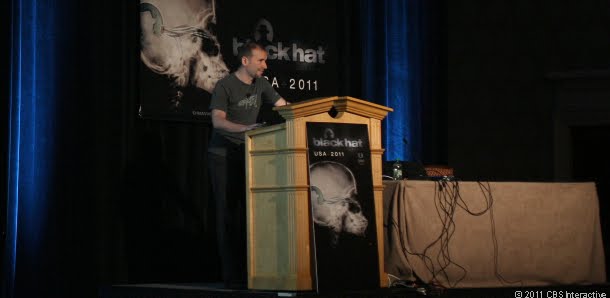
In a few years, "facial visual searches may be as popular as today's text-based searches," says Alessandro Acquisti, who presented his development in cooperation with Ralph Receipts and Fred Stutzman at the Black Hat computer conference.
As a check of idea, the Carnegie Mellon researchers also formed an iPhone app that can position a exposure of someone, piping it through facial recognition software, and then exhibit on-screen that person's canvas and essential statistics.
Few of the professor from Carnegie Mellon University belive that this could be an ominous risks for privacy of any individual.
In another test researchers compared 277,978 Facebook profiles against nearly 6,000 profiles extracted from an unnamed dating Web site. Here also the success rate of software was 40 percent match. Funniest part in this tests are, almost 1 in 10 of the dating site's members--nearly all of whom used pseudonyms--turned out to be identifiable name. Now, this can be a risk for guys dating multiple girls.
Facial recognition technology, which has been developing in labs for decades, is finally going mainstream. Face.com opened its doors to developers last year; the technology is built into Apple's Aperture software and Flickr. Google bought a face-recognition technology in the last few weeks, and Facebook's automated photo-tagging has drawn privacy scrutiny.
Acquisti is the first to admit that the technology isn't perfect. It works best with frontal face photos, not ones taken at an angle. The larger the database becomes, the more time comparisons take, and the more false-positive errors arise.
On the other hand, face recognition technology is advancing quickly, especially for nonfrontal photos. "What we did on the street with mobile devices today will be accomplished in less intrusive ways tomorrow," he says. "A stranger could know your last tweet just by looking at you."
Read more here
Posted in: News